









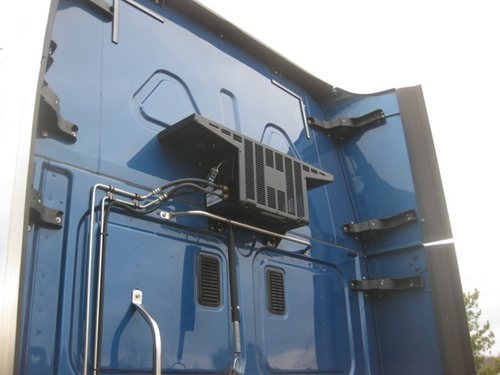
I can't help but dream of a hard line mounted water cooling radiator mounted on the back of the cab with quick disconnects for the desktop. It'd be a good way to vent it outside the truck at least. I would think it wouldn't be too different to the radiators for the AC in freightliners.
Setting up Gaming Desktop in Truck
Discussion in 'Trucking Electronics, Gadgets and Software Forum' started by Blaircroft, Oct 4, 2018.
Page 3 of 3
-
-

Trucking Jobs in 30 seconds
Every month 400 people find a job with the help of TruckersReport.


-
I'm currently running this setup on the same Tundra 1500watt inverter that the OP has with no issues:
PCPartPicker part list / Price breakdown by merchant
CPU: Intel - Core i5-7600T 2.8 GHz Quad-Core Processor (Purchased For $228.89)
CPU Cooler: CRYORIG - C7 Cu 40.5 CFM CPU Cooler (Purchased For $50.00)
Motherboard: ASRock - Z270M-ITX/ac Mini ITX LGA1151 Motherboard (Purchased For $99.99)
Memory: Mushkin - Silverline 16 GB (2 x 8 GB) DDR4-2133 Memory (Purchased For $102.99)
Storage: Western Digital - Black PCIe 256 GB M.2-2280 Solid State Drive (Purchased For $109.99)
Video Card: Zotac - GeForce GTX 1060 6GB 6 GB Mini Video Card (Purchased For $269.99)
Case: Fractal Design - Node 202 HTPC Case w/450 W Power Supply ($124.98 @ SuperBiiz)
Case Fan: Enermax - UCCLA12P 86.69 CFM 120mm Fan (Purchased For $14.02)
Case Fan: Enermax - UCCLA12P 86.69 CFM 120mm Fan (Purchased For $14.02)
Monitor: AOC - G2460PF 24.0" 1920x1080 144 Hz Monitor (Purchased For $189.63)
Other: BitFenix BFA-ACL-12WK6-RP Alchemy Connect LED-Strip White 12cm (Purchased For $21.00)
Total: $1225.50
Prices include shipping, taxes, and discounts when available
Doesn't pull over 200watts unless I'm running a stress test. Also waiting for the other white led case fan and the light strip to come in so I can add those into the system. I do plan to eventually replace the Tundra with a pure sine wave, but I had gotten the Tundra for free including install.


 Dieselboss Thanks this.
 -
Wow, cool. That is a very helpful post for the thread topic. You have built a very low wattage, very small footprint, gaming rig about the size of a large console system. And it runs off a moderate inverter.
For those who are looking to build, that PC Part Picker web site is a great reference.
You could (for example) take @MachoCyclone 's build link and use it as a starting point. Then just make a tweak up or down and save your new list.
Examples:
1) His build with a few bucks shaved in the monitor and SSD drive: Mini truck build 2 - The_Kergan's Saved Part List - Core i5-7600T 2.8 GHz Quad-Core, GeForce GTX 1060 6GB 6 GB Mini, Node 202 HTPC w/450 W Power Supply - PCPartPicker (Eco mini gaming build)
2) His build shaved as in #1, BUT switched the 1060 video card with a 1080: System Builder - Core i5-7600T 2.8 GHz Quad-Core, GeForce GTX 1080 8 GB Mini, Node 202 HTPC w/450 W Power Supply - PCPartPicker (Upper midgrade mini gaming build)
3) His build beefed into an enthusiast build (for max eye candy gaming) : System Builder - Core i7-7700K 4.2 GHz Quad-Core, GeForce GTX 1080 Ti 11 GB Mini, Node 202 HTPC w/450 W Power Supply - PCPartPicker (Monster mini gaming build)
Good job and thanks for the pics dude. Really shows what you can do in a mini form-factor these days and compare pricing to boot.
One question though: what operating system? (not in your build pricing)MachoCyclone Thanks this. -
Windows 10. You can get legit Windows keys cheap if 1) Don't mind getting an OEM key and 2) Know where to look. I personally like Kinguin. Never had a problem with any key from the.Dieselboss Thanks this.


Trucking Jobs in 30 seconds
Every month 400 people find a job with the help of TruckersReport.

Page 3 of 3